Table Reference
Table Reference follows the same draw-and-link pattern as Text Reference, but it writes a table-shaped result into Excel beginning at the active cell. The exported cells still carry the hidden reference name tied to the annotation.
Table Reference Ribbon Command
Table Reference Linked to Excel Range
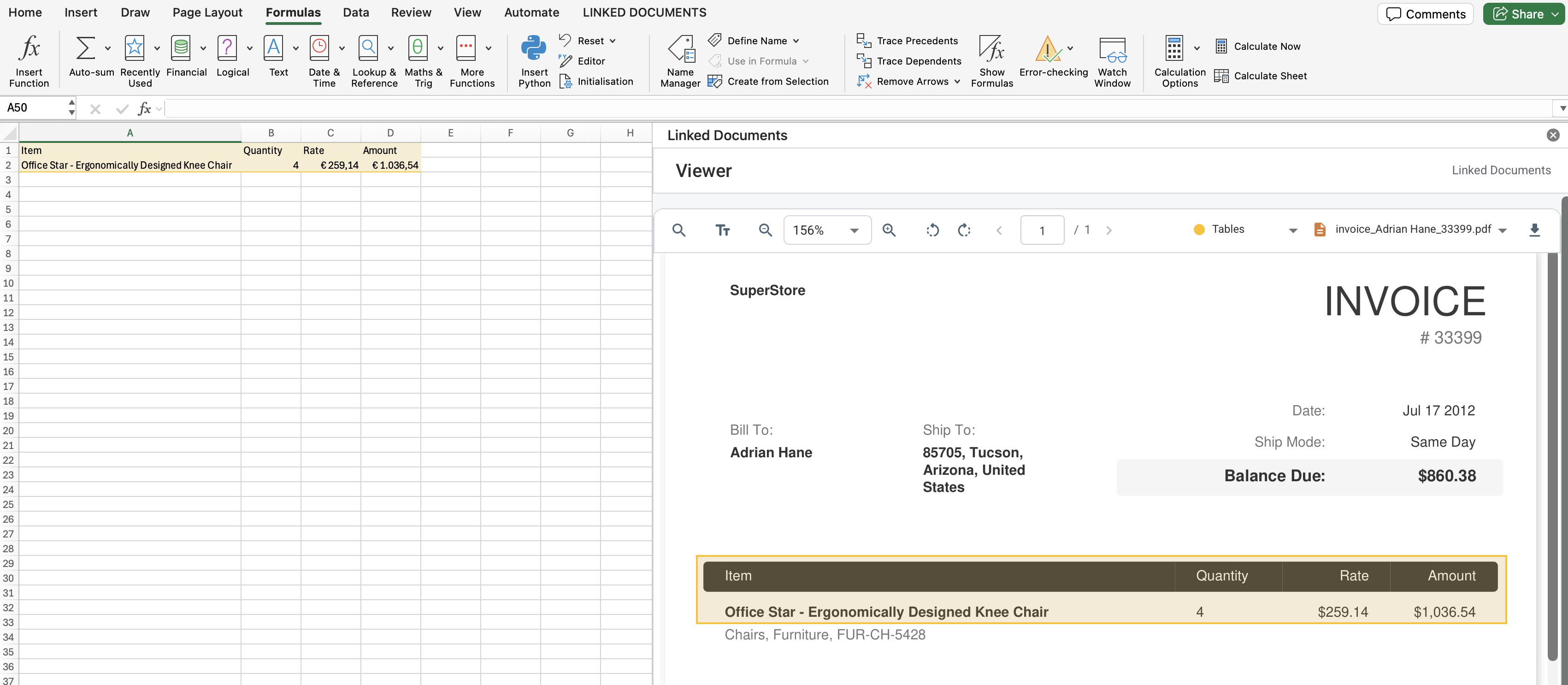
The following example shows a table reference placed on a document page. This reference is related to a specific annotation group called 'Tables' (this group is optional), which defines how the reference is displayed. The tabulated information from the reference has been extracted into a range on the Excel worksheet. This target range is formatted using the same visual styles as the reference in the document.
How It Works
- Select the top-left destination cell in Excel.
- Run Table Reference from the Linked Documents commands.
- Draw a rectangle over the table region in the PDF so the extracted rows and columns are written into the sheet.
What To Keep In Mind
- Use this when the source PDF contains tabular data that should stay traceable back to the page region.
- An empty fallback grid is still written if extraction returns no table content, preserving the reference to the document in the workbook.