Text Reference
With Text Reference, you can select a rectangular area of a PDF and extract the text within it, writing it into the active Excel cell while also creating a link back to the annotation in the document.
You can set a text reference visual style adding the reference to an annotation group and add comments to the text reference. For example, you can use these comments to clarify the reference or provide additional notes.
Screenshots
Text Reference Ribbon Command
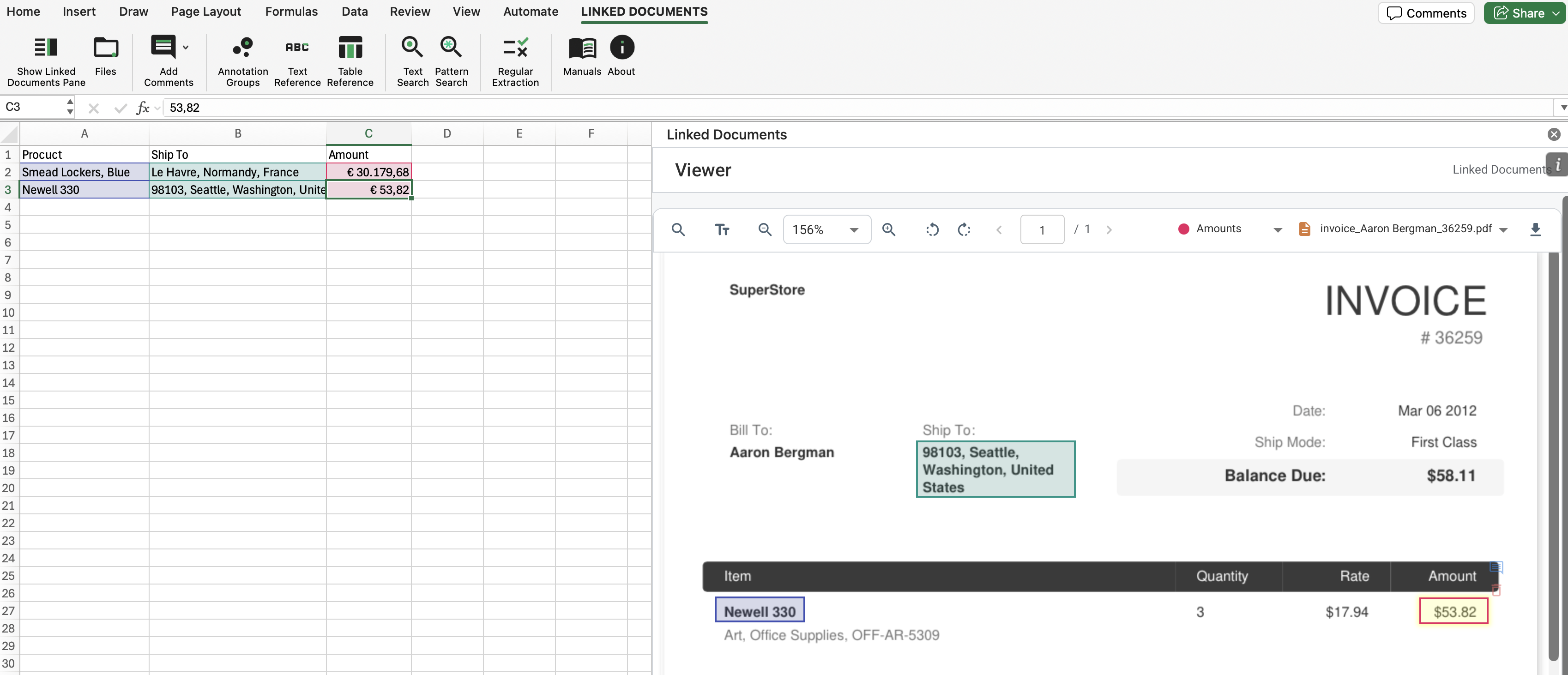
Text References Linked to Excel Cells
The following example shows several text references placed on the document page. Each reference is related to a specific annotation group that defines the display style of the reference. The text from these references has been extracted into cells on the Excel worksheet. These target cells are formatted using the same visual styles as the references in the document.
How It Works
- Select the destination cell in Excel before starting the command.
- Open the PDF in the viewer and run Text Reference.
- Draw a rectangle around the text to extract. The app writes the text to Excel and stores the link back to the PDF region.
- Feel free to edit the text in the target cell in Excel — this will not affect the related text reference in the document. The link to the document will still be preserved.
- Select the target cells in Excel at any time and the page of the document containing the reference will automatically open in Linked Documents. The relevant reference will be highlighted on the page in the PDF viewer.
What To Keep In Mind
- The linked named range allows navigation between the worksheet and the source annotation later.
- If a group is selected, the resulting Excel formatting and annotation color can reflect that group.